How I Ran a 0.6B STT Model Entirely on CPU — Long Recordings Finish in About a Second
A practical walkthrough of making long-form speech recognition feel instant on normal hardware.
The itch
I did not start this project wanting another cloud dictation product. I wanted something simpler and more useful: press a hotkey, talk, press again, and the text would already be on my clipboard, with no account, no GPU requirement, and no heavy setup.
I did not start this project wanting another cloud dictation product. I wanted something dumber and more useful: press a hotkey, talk, press again, and the text is already on my clipboard — with no account, no GPU requirement, and no black terminal window staring at me.
The model I landed on is NVIDIA Parakeet TDT 0.6B v3, quantized to INT8, running through sherpa-onnx on a normal Windows CPU. The shipping app is a Rust tray binary. The interesting part is not that speech recognition works on CPU — it always has — but that the feel of long recordings stopped being proportional to how much I talked.
Two things made that possible: live chunking and multithreading (mic + UI + decode workers + ONNX threads all overlapping). Porting from Python to Rust is what made that pipeline feel reliable enough to ship.
The itch
I began from a small open-source tray app: local-stt. The UX was already right — Ctrl+Shift+Space, system tray, floating overlay, clipboard paste. The original engine was Whisper-family. Fine for a demo. Not what I wanted for daily use.
I swapped the backend to Parakeet. Full-precision PyTorch Parakeet on my machine (CUDA unavailable) was honest but slow: roughly ~10 seconds before text showed up. Accurate, yes. Snappy, no.
So the real question became: can I keep Parakeet-quality transcription and still make long rants feel instant on CPU?
First win: INT8 ONNX
Full torch is the wrong default for a CPU tray app. The same Parakeet family has an INT8 ONNX pack. In Python that meant onnx-asr + ONNX Runtime.
The difference was immediate:
| Path | Rough feel on my CPU |
|---|---|
| Full Parakeet (torch) | ~10s for short dictation |
| Parakeet INT8 (ONNX) | ~3s for short clips |
| Long rant, decode-at-end | still ballooned (~15–17s) |
INT8 fixed short utterances. It did not fix the fundamental CPU tax: if you wait until the user stops speaking and then decode the whole buffer, latency scales with audio length. A long recording is just a longer invoice.
That was the actual product problem.
Chunking: stop waiting for the whole recording
The Python path was basically: record → stop → transcribe everything → clipboard. Great for short clips. Terrible for a two-minute rant, because Parakeet still has to eat the whole buffer after you are done talking.
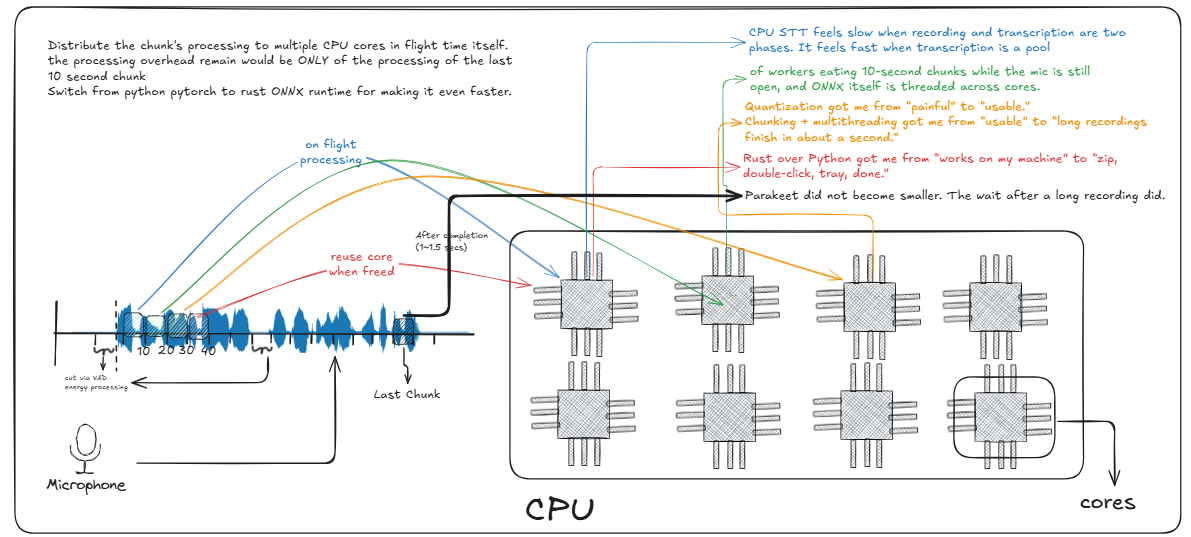
The fix is boring and huge: peel fixed live chunks while the mic is still open.
In the Rust app:
- Mic fills a rolling buffer at 16 kHz.
- Every frame while recording, if the buffer has ≥ 10 seconds, peel that prefix off.
- Queue that chunk to a background ASR worker immediately.
- Keep talking — more chunks keep peeling.
- On stop, only the leftover tail (usually a few seconds) still needs decoding.
- Chunk results are stored by id in a map, then joined in order → clipboard.
On my machine those live chunks were landing around RTF 0.2–0.25 — ten seconds of audio decoded in roughly two seconds. Because that work happens during the recording, the stop-to-clipboard wait collapses to “finish whatever is still in-flight + the tail.” For normal speech that often feels like about a second.
Without chunking, a long recording is one giant job. With chunking, a long recording is many small jobs that mostly finished before you hit stop.
Rendering diagram...
Multithreading: why the wait disappears
Chunking alone is not enough if everything runs on one thread. The app is deliberately concurrent:
1. UI / hotkey thread
eframe/egui owns the message pump. The global hotkey is registered on that same thread so Windows delivers events reliably. Overlay + tray tooltips live here.
2. Mic capture
Audio comes in on the input callback path into a shared buffer. Recording never blocks on ASR.
3. Model load thread
On startup, a background thread downloads (if needed), extracts, and loads Parakeet INT8. The tray stays up with a loading tooltip instead of freezing the desktop.
4. Per-chunk decode threads
Each peeled 10s chunk (and the final tail) is thread::spawn’d into its own worker. Chunks report back over a channel (ChunkDone { id, text }). The UI tracks in_flight and only finalizes when every expected chunk is done.
5. ONNX / sherpa internal threads
Inside each decode, sherpa-onnx gets num_threads from available_parallelism() so a single chunk can use multiple CPU cores for the INT8 session.
So while you talk, you typically have:
- mic filling the buffer
- UI staying responsive
- one or more chunk workers decoding
- ONNX chewing that chunk across CPU threads
That overlap is the whole product. Multithreading is not a polish pass — it is how a 0.6B model on CPU can still feel interactive.
Rendering diagram...
Why Rust helped more than Python
Python got me to a working INT8 engine fast. That mattered. It also hit a ceiling once the product needed a real live pipeline and a clean Windows ship.
Concurrency that matches the design.
Live chunking wants “spawn a worker per chunk, keep counting in-flight, merge by id.” In Rust that is Arc<AsrEngine>, channels, and plain OS threads without fighting the GIL for the orchestration layer. Python can do threads and processes, but the tray + hotkey + mic + overlapping decodes story got messier fast.
Shipping weight.
The Python app dragged torch / onnx wheels, PyInstaller quirks, and a heavier install story. The Rust release is a ~12 MB zip: local-stt.exe + a handful of shared DLLs. First run still downloads the ~465 MB model once — but the app itself is small and boring to distribute.
No console popup.
Python needed --windowed. Rust release builds use windows_subsystem = "windows". Double-click → tray icon. That sounds cosmetic until you remember this is supposed to feel like a background utility.
Predictable native glue.
Global hotkeys, tray, overlay, single-instance TCP lock, off-screen egui viewport — all of that is less cursed as a native binary than as a frozen Python process that sometimes kept the lock port alive after a “silent” relaunch.
Same model, better product shape.
Rust did not make Parakeet smarter. It made the pipeline around Parakeet shippable: live 10s chunks, multithreaded decode, tray-only UX, GitHub Release zip. That is why the port helped a ton.
The Rust app keeps the same UX the Python prototype had:
- system tray only
- floating overlay
- global hotkey
- single-instance lock on
127.0.0.1:47915 - first-run model download, then fully local
Inference goes through sherpa-onnx with:
sherpa-onnx-nemo-parakeet-tdt-0.6b-v3-int8
What first launch actually does
There is no MSI installer. Unzip and run.
On first launch the app:
- starts in the tray (no terminal)
- checks whether the INT8 model files already exist
- if not, downloads the
.tar.bz2from the sherpa-onnx GitHub release assets - extracts encoder / decoder / joiner / tokens
- loads the session on CPU (background thread, multi-threaded ONNX)
- flips the tray tooltip to Parakeet INT8 ready
After that, launches are basically instant. Network is only for that first model pull.
| Your download speed | First-run model wait (ballpark) |
|---|---|
| ~10 Mbps | ~6–8 min |
| ~50 Mbps | ~2–3 min |
| ~100 Mbps | ~1–2 min |
| Already cached | a few seconds |
Bugs that taught me more than the happy path
A few Windows-specific landmines shaped the final design:
Silent second instance. An old Python process could keep the tray lock port. The new app “did nothing” because it politely refused to start. Single-instance errors need to be loud in logs even when the UI is quiet.
Hidden window killed the hotkey loop. Parking the egui window as fully invisible stopped the event loop on Windows. The fix: keep the OS window “visible” but parked far off-screen when idle, and wake it with request_repaint when the hotkey fires.
MSVC static linking pain. Linking sherpa-onnx statically blew up with /MT mismatches. Shipping with shared DLLs was the sane path.
Release builds must not open a console. Python used --windowed. Rust needed #![windows_subsystem = "windows"] for release so double-clicking feels like a tray utility, not a debug shell.
What shipped
Repo: FirePheonix/parakeet-tdt-v3-CPU-optimized
Release: v0.1.0 — download local-stt-windows-x64.zip, run local-stt.exe, wait for the tray ready state, then dictation with Ctrl+Shift+Space.
Stack in one line: Parakeet TDT 0.6B v3 INT8 → sherpa-onnx → Rust tray app → live 10s chunks → multithreaded decode → clipboard.
What I actually learned
CPU STT feels slow when recording and transcription are two phases. It feels fast when transcription is a pool of workers eating 10-second chunks while the mic is still open, and ONNX itself is threaded across cores.
Quantization got me from “painful” to “usable.”
Chunking + multithreading got me from “usable” to “long recordings finish in about a second.”
Rust over Python got me from “works on my machine” to “zip, double-click, tray, done.”
Parakeet did not become smaller. The wait after a long recording did.